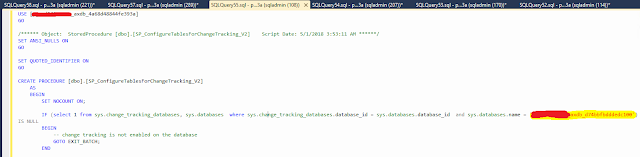
If you are working on a Data management in D365FO you might find that enabling/disabling change tracking on data entities isn’t working. D365 will say that it’s been enabled or disabled but when you check the table in the DB nothing has changed and you get an error when exporting incremental that change tracking isn’t enabled. If you experience this issue, connect to the DB and find the stored procedure [dbo].[SP_ConfigureTablesForChangeTracking_V2] . Confirm that the database name in the stored proc is the same as the DB name that the D365 environment is using. If not, drop the proc, change the DB name in the stored proc to the same as the DB you’re using and create it again. If you have been moving databases between environment to refresh data you’ll most likely be affected by this.
Not sure if this is a bug or a feature but looks like a bug in the D365FO platform. When you pass a composite query into a form using a menu item you can't filter on reference group fields. You get the error "Column is not filterable.". The data still will still displayed correctly, users just can't filter it. Until the issue is resolved, use a simple query per menu item when passing to the form.
Comments
Post a Comment